Don’t Be Fooled When You Shop For New Cell Phones. When You Buy The Latest Mobile Phone, Make Sure It’s Really New.
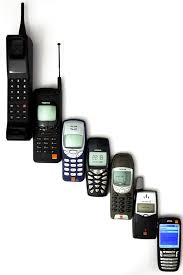
So you’re thinking of buying the latest mobile phone and your friend says “Why not get a used cell phone? It’s cheaper and just as good!” Now that isn’t quite accurate. It may be true that you can get a fairly new second-hand cell phone at a cheaper price, but the question remains, why would you want to?
In the past, new cell phones used to be much more expensive and it was probably better to get a used mobile phone because of the price. But these days, it’s quite different. New cell phones are more reasonably priced and they come with great cell phone plans that you don’t want to miss out on. Obviously, you won’t be able to enjoy these offers when you buy a used phone.
It’s also true that you can still get some of the latest mobile phones when you buy them second-hand. But why would you want to buy a reconditioned phone? It may look like a new cell phone but you wouldn’t know if it has ever been broken or if any of its parts have been removed or replaced. If you’re shopping for the newest cell phones in the market, then you might as well get a brand new phone. The only reason you might want to get a used phone is because the mobile phone model that you’re interested in is either out-of-date or out of stock.
Honestly, if you’re looking to buy a new cell phone, then you might as well head to the store and get the latest mobile phone on offer. At the very least, you know that it’s new out of the box, and there is a negligible risk of your new cell phone breaking down for no apparent reason.
Showing posts with label Science & Technology. Show all posts
Showing posts with label Science & Technology. Show all posts

Buying a simple device like a cell phone can be an overwhelming experience. The device may cost just a few hundred Dollars but there are so many of them on the market and each company is inundating the television and newspaper with so much publicity.
But in the face of all the ad tactics, consumers can work out their own checklist and then screen off manufacturers who do not conform to them.
Let’s try to see some of the factors you may have to consider when making a decision to acquire a handset:
How deep is your budget? You should examine your funds and determine whether the phone you have set your eyes on is affordable. You may want to note that an affordable or cheap phone may have all the features you are looking for. Generally phones which sell for $100 and below are quick bulky, have minimal features and have sharp edges. If you are on low budget, seeking second hand phone or simply want basic features, this is the area you may have to venture.
Phones priced $300 thereabout are usually sleek, come with web features and may have voice dialing features. Some may have dual band characteristics and calendars.
Phones selling for $300 and over are the smallest in design, come with advanced features like cameras, video, mp3 capabilities, voice recorders and radio.
You may also have to critically examine the features of the phone to see if they appeal to you and will serve your objectives. If you would like to record appointments, then you may need a phone with an appointment setter or calendar.
If you a traveler, you may have to buy a dual band phone. You may also have to consider dual mode, that is a phone that will work for both analog and digital services. You would also need to get a phone that will accept double SIM so you can have access to multiple services without changing SIMs.
If you are the busy type , you will have to look for phones with long lasting battery and long talk time so you can carry for long without recharging.
Internet users will have to go for phones with more lines of display that is a bigger screen to display about 6 lines so they can be able to read text without much discomfort and too much scrolling.
Buying a cell phone handset is not a chore at all but it is helpful for one to find one that will meet the pocket and at the same time satisfy lifestyle and business objectives.

Short message service (SMS) is a wildly popular feature available on most digital mobile phones. SMS allows users to send short messages to other cell phones. These short messages are called text messages. SMS was invented by a Finnish civil servant named Matti Makkonen. Many people understand what SMS is, but few understand how it actually works.
In SMS, messages are sent with a “store-and-forward” mechanism. The messages are sent to a Short Message Service Center (SMSC), and then relayed to the intended recipient. If the messages do not reach the recipient upon the first attempt, then the SMSC will try again. It is important to understand that SMS delivery is not guaranteed. Many messages cannot be delivered, but the delivery is called “best effort.” The amount of attempts to send a text message varies with the company.
SMS messages are transmitted via SS7 within the standard GSM MAP framework. SMS messages have a certain payload length. The signaling protocol is precisely 140 bytes. In simple terms, SMS messages have very constrained character limits. This is why messages are sent in “txt speak.” Text speak is the practice of shortening words and phrases in order to fit messages into the allowed amount of bandwidth. SMS messages cost different amounts in different countries. In the United States, the average message costs 10 cents.
Text messages do not always have to be sent from mobile phone to mobile phone. AOL Instant Messenger has an option that will send instant messages to a cell phone. Additionally, there is a widget available for Mac OS X Tiger that will allow a user to send text messages to a cell phone from the dashboard. SMS messages can also be utilized to give news alerts. Additionally, SMS messages can be used to give sports updates and statistics. In this way, SMS messages are very versatile.
Technology is constantly evolving. SMS services prove that communication is becoming broader and easier. Technologists predict that SMS service will advance such that the service will be more reliable, and be able to store more data for the purpose of transmission.

There is growing consensus that cell phone antennas may be harmful to humans due to the huge volume of electromagnetic waves that get concentrated around it during the receipt and placing of calls. This danger is even further aggravated by cellular manufacturers who place the internal antennas close to the earpiece.
Mobile phones are basically radio sets and therefore emit energy radio signals that can penetrate the body and cause harm.
There have been several commissions on the study of the effect of mobile phone on the human body and the most pronounced has been The Stewart Report which suggested that radio waves indeed penetrate human bodies from mobile phone antennas and specially recommended that children who obviously have softer skulls be extra careful and use the device sparingly. The report further went on to state that the brain cells of children are not as fully developed as those of adults and can therefore be at greater risk as they absorb the radiation more than fully hardened adult skulls.
These hazards may exist but cell phones have become part of everyday living like cars and cannot be dispensed with. In the light of this fact, doing away with our phones may not be a practical approach to solving the health hazards issue. Rather we can adopt some habits to mitigate the effects of the radiation.
Children should not use cell phones for long calls. They should sue land lines instead so as to minimize the length of contact with the radiation emitted by the device.
Consumers should buy phones with low specific absorption rate (SAR). Mobile phones should be kept away from the body as much as possible. They can be put in the purse or bag and only brought into contact with the body when there is the need to make or receive a call.
Users should try to keep their conversations short.
If possible, SMS messages can be sent instead of calls so that there is less contact with the body especially around the skull area.
Keep switching between both ears so that one particular ear does not absorb the full brunt of the radiation all the time.
Radiation emission is at the highest when the phone is trying to connect so keep the phone away from the skull till you see the call fully connected.
Weak signal results in higher radiation so avoid making calls in areas where reception is poor as the device will try to boost its power to get you a connection and resultantly bombard you with more radiation.
We cannot do away with cellular devices looking at the convenience they have ushered consumers in. Nevertheless, we can adopt some helpful attitudes to minimize the harmful effects this technology is bringing to mankind.
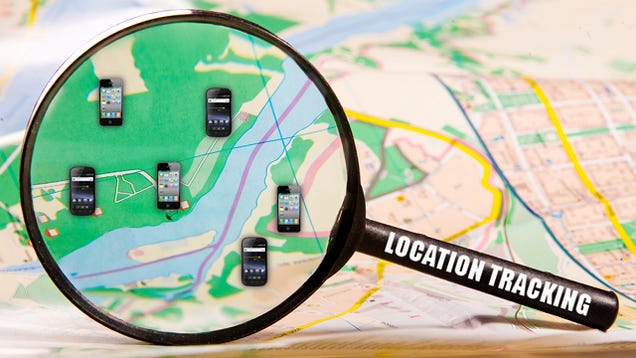
Location tracking is becoming easier to do. Before, investigators had to talk to people to find out where someone was. This took many hours with little chance for success. Today location tracking is much easier with the innovation of GPS products. This new technology has made it much easier to locate the missing.
GPS works by satellite to track the position and determines where the GPS receiver is. The hope is that the person that it lost has a GPS receiver on them so their location can be tracked. This may sound like a rare thing that only happens in the movies, when they are able to track someone’s location.
On the contrary, GPS receivers are becoming more and more popular. The tools in movies are a little more realistic these days than they used to be. Location tracking is more popular with the general public for directions. What they do not realize is that the location tracking that they use to keep from getting lost can also be used to find them.
HP refurbished laptops can be found on their website hpshopping.com. Just enter “refurbished laptop” into their search field and browse through the current selections. (Note that Hewlett-Packard also owns and distributes Compaq computers.) There you can purchase a quality refurbished laptop for up to 30% off the new retail price.
The HP lines are named Pavilion and Omnibook; the Compaq brand offers the Presario laptop at refurbished rates.
The Pavilion line is by far the most popular. They are most suited to replace your home desktop computer, or assist any student in creating the perfect reports and multimedia presentations. They are slim, sleek, and very mobile – usually under 5 pounds. In order of performance, the most common Pavilion notebooks are the ze4000, ze5000, and ze1200. They come as cheap as $1000 from the manufacturer.
The Omnibook line is more suited to the serious home user and businessperson. They feature powerful, long-lasting batteries, interchangeable media bays, and ultra slim design – usually less than 4 pounds. These can cost as little as $1200 refurbished. The 20-30% savings is immense. They come with Intel Pentium 3, 4, or M processors. The most common lines are the 6100, 6200, and 4100 models. Ask the manufacturer or private refurbished laptops dealer for details on which Omnibook would fit you.
The Compaq Presario line is perfect for the money-conscience laptop user. One Presario model utilizes an Intel Celeron M processor to power the amazing graphics capabilities. It features 512MB of RAM and a jaw-dropping 40GB of hard drive space. It includes a DVD/CD-RW, which allows you to both play and record any DVD or CD that you wish. You can get all of these features for only $800, making it not the least expensive of refurbished laptops, but certainly a great deal.
As with most other manufacturers who offer refurbished laptops, HP offers a 90-day warranty.
The HP lines are named Pavilion and Omnibook; the Compaq brand offers the Presario laptop at refurbished rates.
The Pavilion line is by far the most popular. They are most suited to replace your home desktop computer, or assist any student in creating the perfect reports and multimedia presentations. They are slim, sleek, and very mobile – usually under 5 pounds. In order of performance, the most common Pavilion notebooks are the ze4000, ze5000, and ze1200. They come as cheap as $1000 from the manufacturer.
The Omnibook line is more suited to the serious home user and businessperson. They feature powerful, long-lasting batteries, interchangeable media bays, and ultra slim design – usually less than 4 pounds. These can cost as little as $1200 refurbished. The 20-30% savings is immense. They come with Intel Pentium 3, 4, or M processors. The most common lines are the 6100, 6200, and 4100 models. Ask the manufacturer or private refurbished laptops dealer for details on which Omnibook would fit you.
The Compaq Presario line is perfect for the money-conscience laptop user. One Presario model utilizes an Intel Celeron M processor to power the amazing graphics capabilities. It features 512MB of RAM and a jaw-dropping 40GB of hard drive space. It includes a DVD/CD-RW, which allows you to both play and record any DVD or CD that you wish. You can get all of these features for only $800, making it not the least expensive of refurbished laptops, but certainly a great deal.
As with most other manufacturers who offer refurbished laptops, HP offers a 90-day warranty.
The Internet can be a dangerous place.
While you're enjoying the convenience of online shopping,
Internet banking and subscription websites, nasty people
lurk around every corner.
Hackers, fraudsters, identity thieves and many others would
love to get hold of your personal details.
And what stands between you and a security disaster?
Your password.
Just 8 little characters long, it's your last line of
defense online. Here are 10 tips for choosing and using
bullet-proof passwords that will protect you from harm:
Tip 1 - Avoid the obvious
Passwords based on personal details are too easy to guess.
Avoid using names, places, favorite sports teams, or
"password".
Tip 2 - Make it non-dictionary
One option a thief might try to crack your password is a
brute-force dictionary attack. Choose something that you
won't find in any dictionary.
Tip 3 - Use the full 8 characters
The more characters a password contains the more secure it
becomes, so fill that password field to the max.
Tip 4 - Mix the case
Deter thieves further by using a combination of upper and
lower-case letters. A mIXeD cAsE password adds another
layer of protection and is ever harder to guess.
Tip 5 - Include non-alphabetic characters
Adding numbers and non-alphabetic characters (like a hyphen)
to your password makes it less likely to be cracked than
something purely alphabetic.
Tip 6 - Don't write it down
This should be obvious but it's amazing how many scraps of
paper surround the world's PCs.
Tip 7 - Assign a different password to each login id
If thieves get hold of your password, they'll try it in
every online system available. Use a separate password at
each website and you won't have all your eggs in one basket.
Tip 8 - Employ a password manager
Remembering multiple secure passwords can be challenging.
Specialist software like http://www.robo-form.com manages
your passwords securely and automates the login process.
Tip 9 - Logout when you're done
Always hit the logout button when you've finished using a
secure site like online banking.
Tip 10 - Close that browser
Web pages and passwords can be cached in the browser, so
close down your browser window for added security.
Follow these simple common-sense tips and you'll enjoy
greater online security while benefiting from the many
advantages the Internet has brought.
While you're enjoying the convenience of online shopping,
Internet banking and subscription websites, nasty people
lurk around every corner.
Hackers, fraudsters, identity thieves and many others would
love to get hold of your personal details.
And what stands between you and a security disaster?
Your password.
Just 8 little characters long, it's your last line of
defense online. Here are 10 tips for choosing and using
bullet-proof passwords that will protect you from harm:
Tip 1 - Avoid the obvious
Passwords based on personal details are too easy to guess.
Avoid using names, places, favorite sports teams, or
"password".
Tip 2 - Make it non-dictionary
One option a thief might try to crack your password is a
brute-force dictionary attack. Choose something that you
won't find in any dictionary.
Tip 3 - Use the full 8 characters
The more characters a password contains the more secure it
becomes, so fill that password field to the max.
Tip 4 - Mix the case
Deter thieves further by using a combination of upper and
lower-case letters. A mIXeD cAsE password adds another
layer of protection and is ever harder to guess.
Tip 5 - Include non-alphabetic characters
Adding numbers and non-alphabetic characters (like a hyphen)
to your password makes it less likely to be cracked than
something purely alphabetic.
Tip 6 - Don't write it down
This should be obvious but it's amazing how many scraps of
paper surround the world's PCs.
Tip 7 - Assign a different password to each login id
If thieves get hold of your password, they'll try it in
every online system available. Use a separate password at
each website and you won't have all your eggs in one basket.
Tip 8 - Employ a password manager
Remembering multiple secure passwords can be challenging.
Specialist software like http://www.robo-form.com manages
your passwords securely and automates the login process.
Tip 9 - Logout when you're done
Always hit the logout button when you've finished using a
secure site like online banking.
Tip 10 - Close that browser
Web pages and passwords can be cached in the browser, so
close down your browser window for added security.
Follow these simple common-sense tips and you'll enjoy
greater online security while benefiting from the many
advantages the Internet has brought.
Shopping online has become more and more popular in America as we are all looking to save a little time and money. E-commerce sales are growing at astronomical numbers ranging from 20-25% per year. And according to Forrester Research, 40% of households are using coupons in their web shopping. The huge increases are obvious: the online savings and discounts are impossible to match by traditional stores constrained by the overhead costs of employees, rent, and insurance. By using some of the tips and tricks mentioned below, you’ll be able to take further advantage of a new American pastime: saving with online shopping!
Tip 1: Don’t buy Ebay. We all know online auctions seem like such a great deal, and it’s easy to get caught up in the emotion of auction. Thing is, auction sites like Ebay and Ubid have become saturated with buyers AND sellers, so virtually any discount found is quickly sought by re-distributors who then add their own markups to your purchase. The online marketplace has enough people out there that you can end up spending hundreds of extra dollars for the same things found in your local mall! Don’t let your emotions get involved – these are not the right places for the aware shopper.
Tip 2: Never pay retail. Take this scenario: You find something you want to buy, maybe the latest craze or fad such as the Ipod. Should you really pay the price that Apple is offering? No! You can find many deals and coupons for the same purchase just by typing, for example, “ipod coupons” into Google. Spend a little time searching through the top ten to twenty results, you’re sure to find the same product for a significant discount. Sometimes, by filling out a survey or signing up for an email list, you’ll get additional savings and many times you can even get your product for free!
Tip 3: Get over your instant gratification desire. Just admit it, buying something always gives you a good feeling and you can’t wait to take pleasure in that new purchase. Anything you’re buying at the mall for that same good feeling can usually be found for a huge discount online. You just have to be willing to wait for the short 2-5 days that it takes for shipping. It’s definitely worth the savings to able to control your emotions and hold off until it arrives via UPS!
Tip 4: Watch out for excessive shipping charges. Many times retailers slash their costs to get the sale but then charge more for shipping. Make sure to check the final cost to ensure you didn’t receive any unwarranted charges. You should also find a free shipping deal at any of the online coupon sites. Sometimes the shipping can cost more than your purchase!
Tip 5: Online coupons: Were you aware of online coupon websites that have discount and promotion codes to nearly all internet stores? These types of websites always have up to date discount offers arranged by category or store, so you can always find something on sale. It’s not only a way to get a good deal but you can also find some of the free shipping offers listed in tip 4. Just be careful to check for a coupon code before making any internet purchase. It’s a simple way to find extra savings.
Tip 1: Don’t buy Ebay. We all know online auctions seem like such a great deal, and it’s easy to get caught up in the emotion of auction. Thing is, auction sites like Ebay and Ubid have become saturated with buyers AND sellers, so virtually any discount found is quickly sought by re-distributors who then add their own markups to your purchase. The online marketplace has enough people out there that you can end up spending hundreds of extra dollars for the same things found in your local mall! Don’t let your emotions get involved – these are not the right places for the aware shopper.
Tip 2: Never pay retail. Take this scenario: You find something you want to buy, maybe the latest craze or fad such as the Ipod. Should you really pay the price that Apple is offering? No! You can find many deals and coupons for the same purchase just by typing, for example, “ipod coupons” into Google. Spend a little time searching through the top ten to twenty results, you’re sure to find the same product for a significant discount. Sometimes, by filling out a survey or signing up for an email list, you’ll get additional savings and many times you can even get your product for free!
Tip 3: Get over your instant gratification desire. Just admit it, buying something always gives you a good feeling and you can’t wait to take pleasure in that new purchase. Anything you’re buying at the mall for that same good feeling can usually be found for a huge discount online. You just have to be willing to wait for the short 2-5 days that it takes for shipping. It’s definitely worth the savings to able to control your emotions and hold off until it arrives via UPS!
Tip 4: Watch out for excessive shipping charges. Many times retailers slash their costs to get the sale but then charge more for shipping. Make sure to check the final cost to ensure you didn’t receive any unwarranted charges. You should also find a free shipping deal at any of the online coupon sites. Sometimes the shipping can cost more than your purchase!
Tip 5: Online coupons: Were you aware of online coupon websites that have discount and promotion codes to nearly all internet stores? These types of websites always have up to date discount offers arranged by category or store, so you can always find something on sale. It’s not only a way to get a good deal but you can also find some of the free shipping offers listed in tip 4. Just be careful to check for a coupon code before making any internet purchase. It’s a simple way to find extra savings.
Some of my friends think that creating a wifi hotspot requires some
coding knowledge and hence its really a difficult task. However, in reality,
creating a wifi hotspot in Windows, system is easier than all other operating systems.
Still I am here to show you a trick to build your own wifi hotspot within a single click.
You no longer needed to go through multiple options, which might look like tedious.
Here We Go...
Part 1

Open Notepad, copy and paste below code into it
netsh wlan set hostednetwork mode=allow ssid=WifiSpot key=HackingTricks
netsh wlan start hostednetwork
Change the SSID value colored with red with the name of your hotspot.
Change the key value colored with blue with the security code required to authenticate users.
Save this file as StartWifi.bat. Make sure you have given the extension as *.bat.
Part 2
Create another notepad file and paste the below code into it.
netsh wlan stop hostednetwork
Save this file as StopWifi.bat. (this file is to stop our Wi-Fi Hotspot)
So from now when ever you want to start the Wi-Fi Hotspot, simply double-click the
StarWifi.bat file and your Wi-Fi hotspot will start to broadcast. As soon as you are done you can
double-click the StopWifi.bat file, and your broadcast will be stopped.
coding knowledge and hence its really a difficult task. However, in reality,
creating a wifi hotspot in Windows, system is easier than all other operating systems.
Still I am here to show you a trick to build your own wifi hotspot within a single click.
You no longer needed to go through multiple options, which might look like tedious.
Here We Go...
Part 1
Open Notepad, copy and paste below code into it
netsh wlan set hostednetwork mode=allow ssid=WifiSpot key=HackingTricks
netsh wlan start hostednetwork
Change the SSID value colored with red with the name of your hotspot.
Change the key value colored with blue with the security code required to authenticate users.
Save this file as StartWifi.bat. Make sure you have given the extension as *.bat.
Part 2
Create another notepad file and paste the below code into it.
netsh wlan stop hostednetwork
Save this file as StopWifi.bat. (this file is to stop our Wi-Fi Hotspot)
So from now when ever you want to start the Wi-Fi Hotspot, simply double-click the
StarWifi.bat file and your Wi-Fi hotspot will start to broadcast. As soon as you are done you can
double-click the StopWifi.bat file, and your broadcast will be stopped.
An associate era of slick gadgets, PCs ar the dinosaurs, ensnared in wire muddle, sporting tired 2nd cameras and stricken with the occasional blue screen of death. Technology turning out in 2015, though, is ready to form PCs a lot of interactive, fun and maybe nosier than you’d like them to be.
Apple’s iPad modified the method folks viewed computers and spurred computer innovation. Hardware manufacturers thespian ideas from mobile devices, vice consoles and even 3D printers to rethink the computer, and also the ensuing new technologies can have a profound result on however laptops and desktops ar used next year and into the longer term.
Perhaps the foremost fascinating plan is Intel’s “wire-free” computer, within which wireless technology can replace show, charging and knowledge transfer cables. Chip maker Intel next year can show associate experimental laptop computer that has no ports, and depends utterly on wireless technology to attach to monitors and memory device devices.
Interactive computers can have 3D cameras that behave a lot of like eyes, with the power to acknowledge objects and live distances. Sensory input through sound, voice and bit can facilitate PCs reply to and anticipate our desires.
And like per annum, PCs can get dilutant, faster, lighter and have longer battery life. Games and films can look smashing with higher-resolution displays. The new technology, however, can escort a value.
Here ar six unquiet technologies that might modification the face of computing within the next year:
Wireless charging
Place a laptop computer on a table, and it’ll mechanically begin charging. No wires required, no got to carry an influence brick. That’s however Intel views wireless charging for laptops, that may become a reality next year. Intel desires to form wireless chargers as simple to seek out as a Wi-Fi signal, and desires to bring the technology to cafes, restaurants, airports and alternative public places therefore laptops may be recharged while not power adapters. the primary laptops with wireless charging may commence next year, and Intel has shown many prototypes laptop computer being recharged on a table.
Intel is backing the Rezence resonance wireless charging technology, promoted by the Alliance for Wireless Power, or A4WP. the ability flow can ab initio be restricted, enough to wirelessly recharge ultraportables and hybrids. Plans need inflated power output to recharge thought laptops. however obtaining the technology to public places and amusement spots may take some years. Some cafes and restaurants already give wireless charging bases for tablets and smartphones, and have an interest in adding laptops to the combination.
Beam the image, Scotty
It may conjointly become doable to attach laptops wirelessly to displays, that may eliminate costly HDMI or DisplayPort show cables. A wireless show can begin operating as before long as a portable computer is inside vary. Intel envisions a portable computer ultimately having the ability to attach to multiple wireless monitors, that might be helpful in lecture rooms or conferences. One portable computer are able to stream to monitors on multiple desks. Intel is pushing the initial plan through a “smart dock” that connects a portable computer to a wireless monitor.
Wireless displays can gain momentum with the growing adoption of WiGig, a quicker version of Wi-Fi which will handle wireless 4K video streams with none lag. additionally to Intel, Qualcomm can bring WiGig to smartphones and tablets next year, thus users are able to stream Netflix directly from a smartphone or pill to a wireless TV. show manufacturers also will build into monitors and TVs within the returning years.

Creative desktops
From its origin as a boring white box, the desktop has become a hub of ability and imagination, with technologies like depth-sensing cameras and 3D printing spinning off a range of innovations.One example is HP’s Sprout, that appears like a standard all-in-one laptop, however packs the most recent imaging and collaboration technology. At the bottom of Sprout may be a large bit pad known as barely Mat, that may be a dual-purpose digital canvas on that pictures are often scanned and additionally manipulated. A 3D depth-sensing camera lodged in Sprout scans the objects placed on the bit Mat—for example, if a mug is placed on the canvas, the 3D camera can scan it to depth and size. A projector on prime of Sprout will then replicate the scanned image of a mug on the bit Mat, that artists will then manipulate by touching the digital canvas. power unit says the scanning and manipulation may well be helpful for making objects that might be 3D-printed. But at $1,899, Sprout is taken into account a rich experimental desktop.
Otherwise, holler has developed a “smart table,” with associate degree all-in-one laptop beaming a virtual keyboard onto a table on that users will kind. It’s a motivating idea, however a correct keyboard is also a much better plan.
Apple’s iPad modified the method folks viewed computers and spurred computer innovation. Hardware manufacturers thespian ideas from mobile devices, vice consoles and even 3D printers to rethink the computer, and also the ensuing new technologies can have a profound result on however laptops and desktops ar used next year and into the longer term.
Perhaps the foremost fascinating plan is Intel’s “wire-free” computer, within which wireless technology can replace show, charging and knowledge transfer cables. Chip maker Intel next year can show associate experimental laptop computer that has no ports, and depends utterly on wireless technology to attach to monitors and memory device devices.
Interactive computers can have 3D cameras that behave a lot of like eyes, with the power to acknowledge objects and live distances. Sensory input through sound, voice and bit can facilitate PCs reply to and anticipate our desires.
And like per annum, PCs can get dilutant, faster, lighter and have longer battery life. Games and films can look smashing with higher-resolution displays. The new technology, however, can escort a value.
Here ar six unquiet technologies that might modification the face of computing within the next year:
Wireless charging
Place a laptop computer on a table, and it’ll mechanically begin charging. No wires required, no got to carry an influence brick. That’s however Intel views wireless charging for laptops, that may become a reality next year. Intel desires to form wireless chargers as simple to seek out as a Wi-Fi signal, and desires to bring the technology to cafes, restaurants, airports and alternative public places therefore laptops may be recharged while not power adapters. the primary laptops with wireless charging may commence next year, and Intel has shown many prototypes laptop computer being recharged on a table.
Intel is backing the Rezence resonance wireless charging technology, promoted by the Alliance for Wireless Power, or A4WP. the ability flow can ab initio be restricted, enough to wirelessly recharge ultraportables and hybrids. Plans need inflated power output to recharge thought laptops. however obtaining the technology to public places and amusement spots may take some years. Some cafes and restaurants already give wireless charging bases for tablets and smartphones, and have an interest in adding laptops to the combination.
Beam the image, Scotty
It may conjointly become doable to attach laptops wirelessly to displays, that may eliminate costly HDMI or DisplayPort show cables. A wireless show can begin operating as before long as a portable computer is inside vary. Intel envisions a portable computer ultimately having the ability to attach to multiple wireless monitors, that might be helpful in lecture rooms or conferences. One portable computer are able to stream to monitors on multiple desks. Intel is pushing the initial plan through a “smart dock” that connects a portable computer to a wireless monitor.
Wireless displays can gain momentum with the growing adoption of WiGig, a quicker version of Wi-Fi which will handle wireless 4K video streams with none lag. additionally to Intel, Qualcomm can bring WiGig to smartphones and tablets next year, thus users are able to stream Netflix directly from a smartphone or pill to a wireless TV. show manufacturers also will build into monitors and TVs within the returning years.
Creative desktops
From its origin as a boring white box, the desktop has become a hub of ability and imagination, with technologies like depth-sensing cameras and 3D printing spinning off a range of innovations.One example is HP’s Sprout, that appears like a standard all-in-one laptop, however packs the most recent imaging and collaboration technology. At the bottom of Sprout may be a large bit pad known as barely Mat, that may be a dual-purpose digital canvas on that pictures are often scanned and additionally manipulated. A 3D depth-sensing camera lodged in Sprout scans the objects placed on the bit Mat—for example, if a mug is placed on the canvas, the 3D camera can scan it to depth and size. A projector on prime of Sprout will then replicate the scanned image of a mug on the bit Mat, that artists will then manipulate by touching the digital canvas. power unit says the scanning and manipulation may well be helpful for making objects that might be 3D-printed. But at $1,899, Sprout is taken into account a rich experimental desktop.
Otherwise, holler has developed a “smart table,” with associate degree all-in-one laptop beaming a virtual keyboard onto a table on that users will kind. It’s a motivating idea, however a correct keyboard is also a much better plan.
1. Install anti-virus software from well-known, reputable company, update it regularly, and use it regularly.
2. New viruses comes out every single day; an antivirus program that hasn't been updated for several months will not provide much protection against current viruses.
3. In addition to scanning for virus on regular basic, install an 'on access' scanner (included, in most good antivirus software packages) and configure it to start automatically each time you boot your system. tis will protect your system by checking for viruses each time your computer accesses an executable file.
4. Virus scans any new programs or other files that may contain executable code before you run or open them, no matter where they come from, there have been case of commercially distributed disk and CD-ROMs spreading virus infections.
5. Anti-virus programs aren't very good at detecting Trojen horse programs, so be extremely careful about opening binary files and word/excel documents from unknown or 'dubious' sources. this includes posts in binary newsgroup, download from web/ft sites aren't well-known or don't have a good reputation, and executable files unexpectedly recived as attachments to E-mail or durin an on-line chat session.
6. If your e-mail or news software has the ability to automatically execute javascript, word macros, or other executable code contained n or attached to a message,i strongly recommend that you disable this feature.

7. Be extremely careful about accepting programs or other files during on-line chat sessions, this seems to be one of the more common means that people wind up with virus or Trojan horse problems. And if the computer make sure they know not to accept any files while using chat.
8. Do regular backup. some virus and Trojan horse programs will erase or corrupt files on your harddrive anda recent backup may be the only way to recover you data.
Ideally you should back up your entire system on regular basis.if this isn't practical at least backup files that you can't afford tolose or that would be difficult to replace documents,bookmarks,files,address books,important E-mail, etc.
2. New viruses comes out every single day; an antivirus program that hasn't been updated for several months will not provide much protection against current viruses.
3. In addition to scanning for virus on regular basic, install an 'on access' scanner (included, in most good antivirus software packages) and configure it to start automatically each time you boot your system. tis will protect your system by checking for viruses each time your computer accesses an executable file.
4. Virus scans any new programs or other files that may contain executable code before you run or open them, no matter where they come from, there have been case of commercially distributed disk and CD-ROMs spreading virus infections.
5. Anti-virus programs aren't very good at detecting Trojen horse programs, so be extremely careful about opening binary files and word/excel documents from unknown or 'dubious' sources. this includes posts in binary newsgroup, download from web/ft sites aren't well-known or don't have a good reputation, and executable files unexpectedly recived as attachments to E-mail or durin an on-line chat session.
6. If your e-mail or news software has the ability to automatically execute javascript, word macros, or other executable code contained n or attached to a message,i strongly recommend that you disable this feature.
7. Be extremely careful about accepting programs or other files during on-line chat sessions, this seems to be one of the more common means that people wind up with virus or Trojan horse problems. And if the computer make sure they know not to accept any files while using chat.
8. Do regular backup. some virus and Trojan horse programs will erase or corrupt files on your harddrive anda recent backup may be the only way to recover you data.
Ideally you should back up your entire system on regular basis.if this isn't practical at least backup files that you can't afford tolose or that would be difficult to replace documents,bookmarks,files,address books,important E-mail, etc.
A computer virus is a program designed to spread itself by first infecting excutable file or the system areas of hard disk and then making copies of itself. viruses usually operte without the knowledge or desire of the computer user.
In other word, virus is a program that has been written to cause problems on someone else's computer. viruses may cause data to be lost or corrupted. a virus is usually passed from computer to computer over telephone link. special anti-virus software can sometime be used to stop virus.

Virus is defined as a program inserted into another program. it gets activated by its host program. its replicates itself and spread to others through pen drive or hard drive transfer, mail and shared media. A virus infects data or program every time the user run the infected program and the virus takes advantages and replicates itself. Some viruses are c-Brain, Macmag sore casade, Jerusalem, Internet, Patch COM,
some of the common virus activities are here
1. Computer viruses infect executable program file such as word processing, spreadsheet, or operating system program. They do not run smoothly or frequently hang.
2.Viruses can also infect disk by attaching themselves to special program in areas of your disk called boot record and master boot records. these are the programs your computer uses to startup.
3. The computer may not boot and hang etc.
4. The size of file is changed.
In other word, virus is a program that has been written to cause problems on someone else's computer. viruses may cause data to be lost or corrupted. a virus is usually passed from computer to computer over telephone link. special anti-virus software can sometime be used to stop virus.
Virus is defined as a program inserted into another program. it gets activated by its host program. its replicates itself and spread to others through pen drive or hard drive transfer, mail and shared media. A virus infects data or program every time the user run the infected program and the virus takes advantages and replicates itself. Some viruses are c-Brain, Macmag sore casade, Jerusalem, Internet, Patch COM,
some of the common virus activities are here
1. Computer viruses infect executable program file such as word processing, spreadsheet, or operating system program. They do not run smoothly or frequently hang.
2.Viruses can also infect disk by attaching themselves to special program in areas of your disk called boot record and master boot records. these are the programs your computer uses to startup.
3. The computer may not boot and hang etc.
4. The size of file is changed.
HTML is a simple scripting language used to create Hypertext Documents.
Hypertext is simply a piece of text that works as a link.
Markup Language is a way of writing layout information within documents.
HTML is a collection of Markup Tags (platform-independent) that define the various
components of a worldwide web documents. We can use any types of text editors (like
Notepad, Edit pad..) for HTML Coding.
HTML documents are saved with .htm or .html extensions.
Tags:
In HTML, all commands (code) are called Tags. Tags are not case sensitive. There are

two types of tag:
• Single (empty/unpair) tag
These types of tag don't have its ending tags like : <BR>, <!>, <HR> etc.
• Pair (container) tag
Tags with starting and endings are called Container tags. We have to close these
types of tags; otherwise, they will not function properly. Container tags are ended
with slash (/) key.
Tag consists of three parts:
• Element (main tag) - Identification of Tag
• Attribute - Property of Tag
• Value - Value assigned for Attributes
For example:
<BODY BGCOLOR = "RED">
BODY = Element (Main Tag)
BGCOLOR = Attribute
"RED" = Attribute Value
Note 1: We only have to close the Element (Main) Tags like </body> in the end.
Note 2: We can use more than one attributes and its value for the Element. For example:
<font size=5 color=red>
Hypertext is simply a piece of text that works as a link.
Markup Language is a way of writing layout information within documents.
HTML is a collection of Markup Tags (platform-independent) that define the various
components of a worldwide web documents. We can use any types of text editors (like
Notepad, Edit pad..) for HTML Coding.
HTML documents are saved with .htm or .html extensions.
Tags:
In HTML, all commands (code) are called Tags. Tags are not case sensitive. There are
two types of tag:
• Single (empty/unpair) tag
These types of tag don't have its ending tags like : <BR>, <!>, <HR> etc.
• Pair (container) tag
Tags with starting and endings are called Container tags. We have to close these
types of tags; otherwise, they will not function properly. Container tags are ended
with slash (/) key.
Tag consists of three parts:
• Element (main tag) - Identification of Tag
• Attribute - Property of Tag
• Value - Value assigned for Attributes
For example:
<BODY BGCOLOR = "RED">
BODY = Element (Main Tag)
BGCOLOR = Attribute
"RED" = Attribute Value
Note 1: We only have to close the Element (Main) Tags like </body> in the end.
Note 2: We can use more than one attributes and its value for the Element. For example:
<font size=5 color=red>
some time you can face the problem that your mouse isn't working perfectly or not working anymore
at that time you can use the keyboard as the mouse.
 you can control your mouse scroll by your keyboard num pad by pressing 4-6-8-2.
to make that keyboard work like mouse press
Shift+Alt+NumLock and as you press this three keys
a popup will appear,after that press ok.
and try to use mouse scroll by pressing num key 8-2-4-6.
at that time you can use the keyboard as the mouse.
to make that keyboard work like mouse press
Shift+Alt+NumLock and as you press this three keys
a popup will appear,after that press ok.
and try to use mouse scroll by pressing num key 8-2-4-6.
Pretty Helen s a women of without 2 legs. She missed her legs by her own idea. “When she lost her legs she thought her life was over, but now she have so much to live for,” she said. A woman who lost both her legs in an attempt to take her own life has spoken of her joy at recovering and becoming a mum. Pretty Helen Galsworthy was just 18 years old when she walked on to the tracks close to her home in Eastleigh, Hampshire. Suffering from depression and addicted to cocaine, she wanted to end her life. But she moved just as the train approached taking off both legs below the knee. Incredibly, Helen was conscious for just long enough to see her detached legs lying on the track.
Thankfully, a passing dog walker found her and she was rushed to hospital. Now, seven years later, 25-year-old Helen says she can finally talk about the ordeal and coming to terms with being an amputee. And she is moving on with her life after having a little boy, Thomas. Woman who lost legs in suicide attempt finds happiness after becoming a mum Helen Galsworthy lost both her legs after lying in front of a train when suffering from depression. Thomas has made me realise that I’m here for a reason. She said: “Strangely I felt really happy. I was more at peace than I had been for a long time.
 She just lay down and shut my eyes and put some music on waiting for when I got hit by the train, but it didn’t go to plan. She moved slightly at the last minute and ended up with just my legs across the tracks. I just remember thinking, ‘Oh god, I’ve really messed this up’. I could see a lot of blood and the end of my jeans were cut off. It was agonising. After six weeks in hospital Helen was discharged, but she struggled to cope without her legs.
Helen said: “I didn’t think anyone would want me and I thought I’d never be able to achieve the things I had wanted in life like getting married and having children. For a long time life was unbearable until 2011 when I fell pregnant with Thomas. Thomas wasn’t planned and I thought I had put my body through too much to ever be able to conceive. And now Helen has started university again, and is studying for a degree in criminology.studying for a degree in criminology.
Thankfully, a passing dog walker found her and she was rushed to hospital. Now, seven years later, 25-year-old Helen says she can finally talk about the ordeal and coming to terms with being an amputee. And she is moving on with her life after having a little boy, Thomas. Woman who lost legs in suicide attempt finds happiness after becoming a mum Helen Galsworthy lost both her legs after lying in front of a train when suffering from depression. Thomas has made me realise that I’m here for a reason. She said: “Strangely I felt really happy. I was more at peace than I had been for a long time.
Helen said: “I didn’t think anyone would want me and I thought I’d never be able to achieve the things I had wanted in life like getting married and having children. For a long time life was unbearable until 2011 when I fell pregnant with Thomas. Thomas wasn’t planned and I thought I had put my body through too much to ever be able to conceive. And now Helen has started university again, and is studying for a degree in criminology.studying for a degree in criminology.
Dollar Note Production in USA Industries , This process is scientific which is advanced technology use this industries in united state government. All other process is folling by video so see video

We Always Need To Speed Up Our Internet Connection.. Because Most All The Peoples Using Slow Internet Connections Like From Bluetooth Connection, USB Connection.. From These Connections We Always Gets The Very Slow Internet Connection..
Today Im Providing Very Nice Trick To Speed Up Your Internet Connection By 20%..
YesS.. Its True..

JUST FOLLOW BELOW SIMPLE STEPS:
Step:-1) Click On Start And Then Click On RUN Button And Type gpedit.msc And Press OK.. This Opens The Group Policy Editor.
Step:-2) Then Go To,
--> Local Computer Policy
--> Computer Configuration
--> Administrative Templates
--> Network
--> QOS Packet Scheduler
--> Limit Reservable Bandwidth.
Step:-3) Then Double Click On Limit Reservable bandwidth..
(It will say it is not configured, but the truth is under the 'Explain' tab i.e.by default, the Packet Scheduler limits the system to 20 percent of the bandwidth of a connection, but you can use this setting to override the default.)
Step:-4) Above All The Process Enables The reservable bandwidth, Then Set This To ZERO..
(This will allow the system to reserve nothing, rather than the default 20%.)
Hurray.. Now Your Internet Speed Increase Upto 20%.
Enjoy.. And Please Share With Your Friends..
If You Having Any Problem, Dont Forget To Comment Below..
Today Im Providing Very Nice Trick To Speed Up Your Internet Connection By 20%..
YesS.. Its True..
JUST FOLLOW BELOW SIMPLE STEPS:
Step:-1) Click On Start And Then Click On RUN Button And Type gpedit.msc And Press OK.. This Opens The Group Policy Editor.
Step:-2) Then Go To,
--> Local Computer Policy
--> Computer Configuration
--> Administrative Templates
--> Network
--> QOS Packet Scheduler
--> Limit Reservable Bandwidth.
Step:-3) Then Double Click On Limit Reservable bandwidth..
(It will say it is not configured, but the truth is under the 'Explain' tab i.e.by default, the Packet Scheduler limits the system to 20 percent of the bandwidth of a connection, but you can use this setting to override the default.)
Step:-4) Above All The Process Enables The reservable bandwidth, Then Set This To ZERO..
(This will allow the system to reserve nothing, rather than the default 20%.)
Hurray.. Now Your Internet Speed Increase Upto 20%.
Enjoy.. And Please Share With Your Friends..
If You Having Any Problem, Dont Forget To Comment Below..
AIRTEL UNLIMITED 3G DROID VPN TRICK FOR ANDROID
Airtel droid vpn
Hello and welcome to mobile Discovertricks.com .today i am come back with new airtel droid
vpn trick December 2014 for all android user. this trick based on android vpn.,so this
will only work in android mobile phone. this vpn is 100% work in all over India. this vpn give you
very high 3g speed . Airtel droid vpn work with airtel gsm gprs network with unlimited 3gdata . you will be get unlimited internet.
The feature of new airtel droid vpn id are
it works with default airtel apn -- airtelgprs.com
Use any app free of cost which reqiures working internet plans
Their are 6 Free Servers on DroidVPN each provides 100 MB of usage
Stream YouTube Videos on your android free of costs
Use your favorite messenger apps such as whatsapp, wechat, bbm and many other
android app
Setting for airtel droid vpn
1.First of all download DroidVPN app from Google playstore , If you have android ICS or
above version then simply activate NO ROOT MODE otherwise you need a rooted
android(For gingerbread or lower versions).
2.Install and run DroidVPN
3.Go to advanced settings you'll find HTTP HEADERS just Enable it and put the following Host Name and Custom HTTP Headers
Host Name : airtel.in
Custom HTTP Headers : Host: airtel.in/
freezone X-Online-Host: airtel.in/freezone
save and done
4.Now Click on Bind to Local Port and put 8080
5.Now Click on Proxy Settings and Enable it and put the Proxy server and Port Port: http://hidemyass.com/proxy-list/ .
Choose Proxy Servers with Port 3128 or 8080 .
After that all settings have been done , now choose any one of Free Servers from your
DroidVPN and try to connect , connection will be established instantly and you can
enjoy any app which needs active data plans just for free.
if you like and working share with your friends
NEW 3G DOCOMO UPDATED VPN TRICK
2013
my new vpn and config. file for docomo. this config. file updated for October and
November 2013. this vpn give you very highspeed 3g internet in your samsung, htc
and other cheap android phone. this vpn also work all nokia, apple iphone ,
blackberry and micromax window os.The new Docomo 3G VPN Trick is based on a
HVC with UDP protocol VPN. This Tick works perfectly all over India without any
balance deduction issue. Te recently shared Vodafone Twitter trick based on HVC APN
was working in some states but on old SIM cards but this new Docomo 3G UDP VPN for
October 2013 is predicted to work all over India with new APN. features of new docomo 3g vpn 2013
highspeed docomo 3g internet with hvc apn
based on udp port
work all android ,window mobile-pc
working in rajasthan, gujrat and delhi
file download with survey
stream youtube video
docomo vpn trick
new 3g docomo updated vpn trick 2013
work all samsung nokia micromax carbon
cellcon
step to download and connect docomo vpn
2013
This Docomo VPN Trick is based on new
HVC APN and UDP VPN Config. we have
included the full VPN Setup and detailed
instructions in the trick file. You will need to
do a tiny recharge for activating the service.
Once done with the proper tweaks given in
the instructions file you will be able to
browse and download unlimited content free
on superior 3G Speed.
first you download vpn and config. file new
docomo config.file 2013
 Note --- if you don't need survey ----------
follow me by google+ and like my facebook
page.
Note ---- i am give you complete vpn and
config. file. if you click ad in my site then
write your email in my comment box. me
send complete set of docomo trick within
next 1 hour
You do NOT need NMD VPN as we have
included the full portable VPN App.
Now just open the Instructions file and
implement with the given instructions
Make sure 3G is activated on your Docomo
number and you have at least Rs.1 balance
on your main account.
Connect with the Free UDP VPN instantly
after t
Airtel droid vpn
Hello and welcome to mobile Discovertricks.com .today i am come back with new airtel droid
vpn trick December 2014 for all android user. this trick based on android vpn.,so this
will only work in android mobile phone. this vpn is 100% work in all over India. this vpn give you
very high 3g speed . Airtel droid vpn work with airtel gsm gprs network with unlimited 3gdata . you will be get unlimited internet.
The feature of new airtel droid vpn id are
it works with default airtel apn -- airtelgprs.com
Use any app free of cost which reqiures working internet plans
Their are 6 Free Servers on DroidVPN each provides 100 MB of usage
Stream YouTube Videos on your android free of costs
Use your favorite messenger apps such as whatsapp, wechat, bbm and many other
android app
Setting for airtel droid vpn
1.First of all download DroidVPN app from Google playstore , If you have android ICS or
above version then simply activate NO ROOT MODE otherwise you need a rooted
android(For gingerbread or lower versions).
2.Install and run DroidVPN
3.Go to advanced settings you'll find HTTP HEADERS just Enable it and put the following Host Name and Custom HTTP Headers
Host Name : airtel.in
Custom HTTP Headers : Host: airtel.in/
freezone X-Online-Host: airtel.in/freezone
save and done
4.Now Click on Bind to Local Port and put 8080
5.Now Click on Proxy Settings and Enable it and put the Proxy server and Port Port: http://hidemyass.com/proxy-list/ .
Choose Proxy Servers with Port 3128 or 8080 .
After that all settings have been done , now choose any one of Free Servers from your
DroidVPN and try to connect , connection will be established instantly and you can
enjoy any app which needs active data plans just for free.
if you like and working share with your friends
NEW 3G DOCOMO UPDATED VPN TRICK
2013
my new vpn and config. file for docomo. this config. file updated for October and
November 2013. this vpn give you very highspeed 3g internet in your samsung, htc
and other cheap android phone. this vpn also work all nokia, apple iphone ,
blackberry and micromax window os.The new Docomo 3G VPN Trick is based on a
HVC with UDP protocol VPN. This Tick works perfectly all over India without any
balance deduction issue. Te recently shared Vodafone Twitter trick based on HVC APN
was working in some states but on old SIM cards but this new Docomo 3G UDP VPN for
October 2013 is predicted to work all over India with new APN. features of new docomo 3g vpn 2013
highspeed docomo 3g internet with hvc apn
based on udp port
work all android ,window mobile-pc
working in rajasthan, gujrat and delhi
file download with survey
stream youtube video
docomo vpn trick
new 3g docomo updated vpn trick 2013
work all samsung nokia micromax carbon
cellcon
step to download and connect docomo vpn
2013
This Docomo VPN Trick is based on new
HVC APN and UDP VPN Config. we have
included the full VPN Setup and detailed
instructions in the trick file. You will need to
do a tiny recharge for activating the service.
Once done with the proper tweaks given in
the instructions file you will be able to
browse and download unlimited content free
on superior 3G Speed.
first you download vpn and config. file new
docomo config.file 2013
follow me by google+ and like my facebook
page.
Note ---- i am give you complete vpn and
config. file. if you click ad in my site then
write your email in my comment box. me
send complete set of docomo trick within
next 1 hour
You do NOT need NMD VPN as we have
included the full portable VPN App.
Now just open the Instructions file and
implement with the given instructions
Make sure 3G is activated on your Docomo
number and you have at least Rs.1 balance
on your main account.
Connect with the Free UDP VPN instantly
after t
If we use wrong pattern then phone will be locked, but how to unlock again many people don't know to unlock again,
Today i wana tell u a simple tricks to unlock Android Mobile after too many wrong Pattern Attempts.
In my privous post HOW TO DOWNLOAD YOUTUBE VIDEO How to download youtube video for android mobile You already read it,
If u don't know how to Use free internet Then read Here
FREE INTERNET TRICKS
Ok guys Now We go to The tricks how to unlock Android Mobile After Too Many Wrong Pattern Attempts step by step.
If you have Any email insert The android mobile when you start using your mobile then you can easily unlock insert the email and password,
But if you forget your email and password then folow this step to unlock without any email and password.
STET -1
Just turn off your android mobile.
STEP -2
Don't power it ON yet, Continue
press and hold Power button.

STEP -3
Continue press Volume Up with Center
key also with Power key.
If you can't by first time than Try two
or three time it than will be done.
Friends i hope you will done using this simple Tricks, We post this Tricks after test in many android mobile,
So we hope it ill also work for you, If you found that for any one android mobile its not working than inform us by comment below.
You can support us by share this article with your friends,
Thanks for visit and keep it for more tips and trick and working tutorial,
Try once dont say it dsnt work without trying 100% works and dont comment without trying!! For Android and Symbian users
Steps:

- Use internet as much as you want. but dont exceed your balance amount.
- When you dont want to use net anymore then transfer all the amount to another number u know leaving 1 paisa in ur account.
Eg. If you have 16.14 rs in your balance, transfer Rs 16.13 that is equivalent
1613 paisa. But you must leave 1 paisa in to be able to transfer.
(Do not turn off Data untill u transfer the money)
Note : If you fear loosing your balance, do the transfer as soon as you connect to internet.
Note : You can still use internet with 1 paisa in your account. If you are
lucky, you can browse internet with 1 paisa for more than 3 MB .
Note : As we know ntc used to deduce balance for data uese later n keep it in credit bt that system is already removed by ntc so dont worry your balance will not be deduced later.
Free ntc net trick for java phone coming soon,stay with us.
Steps:
- Use internet as much as you want. but dont exceed your balance amount.
- When you dont want to use net anymore then transfer all the amount to another number u know leaving 1 paisa in ur account.
Eg. If you have 16.14 rs in your balance, transfer Rs 16.13 that is equivalent
1613 paisa. But you must leave 1 paisa in to be able to transfer.
(Do not turn off Data untill u transfer the money)
Note : If you fear loosing your balance, do the transfer as soon as you connect to internet.
Note : You can still use internet with 1 paisa in your account. If you are
lucky, you can browse internet with 1 paisa for more than 3 MB .
Note : As we know ntc used to deduce balance for data uese later n keep it in credit bt that system is already removed by ntc so dont worry your balance will not be deduced later.
Free ntc net trick for java phone coming soon,stay with us.


.jpg)


